v0.6.1 Built to run on your infrastructure

The self-hosted agent control plane

Your agents.
One control plane.

Dispatch runs, govern connector calls, review approvals and track usage. Keep your framework and model loop. Runkite handles the operations around them.

Agent Protocol clients. LangGraph and other framework runners. One Go control plane.

See how Runkite works
Runkite AdminDemo data
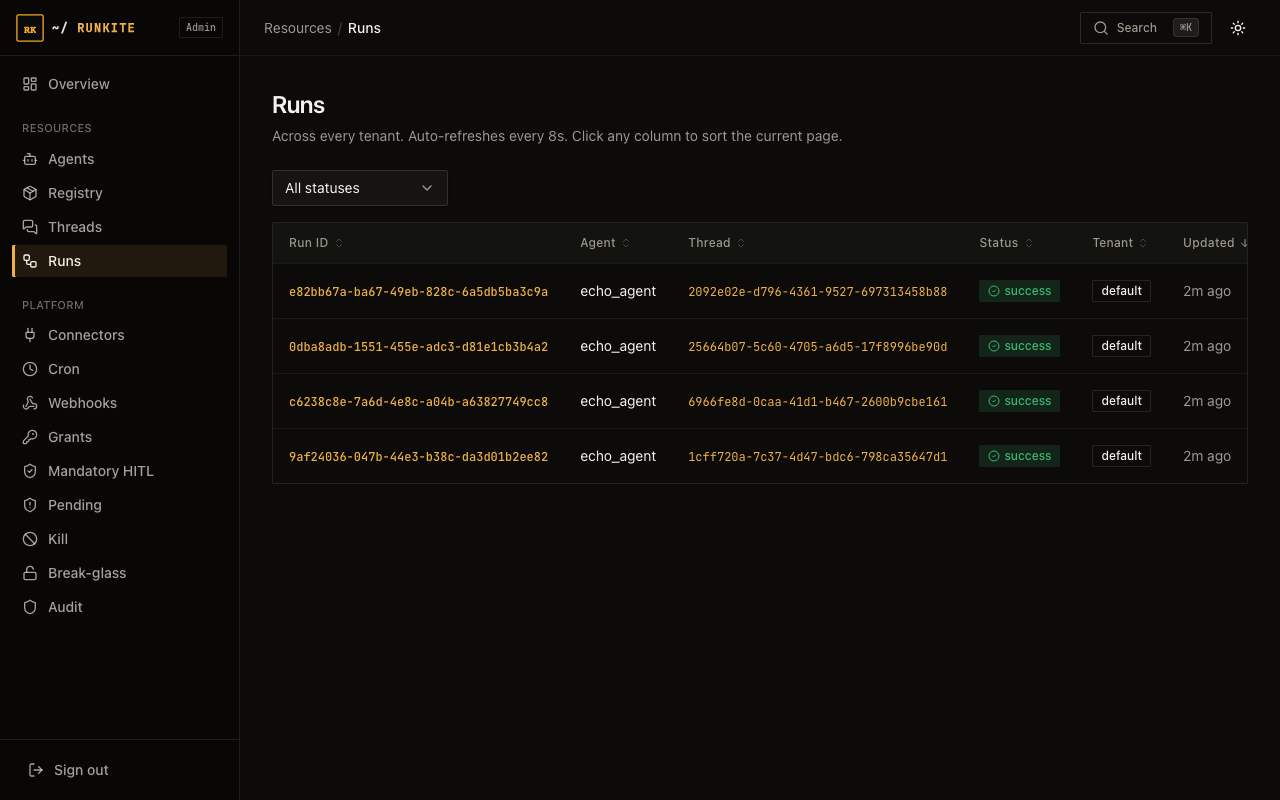
Real Runkite Admin Runs page showing four successful echo-agent runs with their thread, tenant and status.
One place to inspect your managed runs.

Follow the complete managed path

From client to agent execution.
One control plane.

Start with the original LangGraph SDK client path, then look inside the framework runner. These are two views of the same Runkite-managed system.

From a LangGraph SDK client to a completed run

Create a thread, start a run and stream events through Runkite. The graph executes on your runner.

Client / Your app

LangGraph client SDK

langgraph_sdk
or an Agent Protocol HTTP client.

Operate / Schedule

Admin + Cron

Inspect managed runs.
Schedule agent work.

One control plane

Runkite

Threads and runs.
Admission and dispatch.
Cancellation, usage and audit.

Run-bound MCP gate

Grants, credentials and marked-call approval.

Separate process

LangGraph runner

Python or LangGraph.js.
Execute the graph and report events.

Optional / Governed

Your MCP server

Allowed tool calls pass through the plane's proxy.

Client to plane to runner, then back. The LangGraph client SDK creates runs and consumes HTTP/SSE through Runkite. The runner pulls work over gRPC and reports events; Runkite returns the stream to the client. WebSocket is another Runkite client endpoint. Admin and Cron use the same plane.

Model calls originate in the runner. Optional MCP connector calls return through Runkite's gate; direct local tools do not acquire connector policy automatically. Explore the two protocols.

Inside the framework runner

LangGraph, Vercel AI SDK and managed Python SDKs keep their native agent logic in a separate runner.

01 / Request

Your app

Create a thread and run.
Consume the result stream.

02 / Operations

Runkite

Admission, dispatch,
durable state and audit.

03 / Execution

Your framework runner

Your agent logic,
tools and model loop.

04 / Inference

Your model backend

Your SDK's configured provider or model router.

Optional / At Runkite

MCP connector gate

Grants, sessions and marked-call approval.

Configured MCP service

Your MCP server

Plane proxy forwards with resolved credentials.

Illustrated managed execution. Model calls go from the runner to its backend. Optional MCP connector calls return to Runkite's gate, which checks policy and proxies allowed requests to the configured MCP server. Ordinary local tools do not automatically pass through that gate.

Keeping the model loop in your app instead? The separate tool decision API governs individual operations without creating a Runkite thread or run.

Two ways in. One plane.

Choose who owns the run.

Dispatch an agent to a runner, or keep execution in your application and ask the plane for tool decisions.

01 Managed execution Python / TypeScript

Runkite owns the run.
Your runner owns the loop.

Your app creates a thread and run. Runkite dispatches the agent to a separate framework runner and streams the result back.

  1. Your app
  2. Runkite
  3. Your runner
  • Admin Threads and Runs
  • Admission, cancellation and usage
  • Durable state and recovery

Your app keeps its UI, user authentication and presentation history. Local tools acquire connector policy only when they use the connector path.

Build with managed runs
02 App-owned execution Your existing backend

Your app owns the loop.
Runkite decides on a tool call.

Keep execution in your Next, Nuxt or other backend. Ask the decision API before an operation, then execute only after allow.

  1. Your tool
  2. Decision API
  3. Your executor
  • Allow, deny or pending
  • Shared connector policy
  • SQL decision and approval audit

No Runkite thread or run. Run kill switches, break-glass and spend caps do not apply. Pending continuation and execution stay with your app.

Govern an app-owned tool

The AI SDK UI bridge includes Next and Nuxt route recipes for managed TypeScript and Python agents. The bridge and decision helpers live in the repository; they are not standalone published client packages.

The operational layer

From agent code
to an accountable operation.

Use the plane's gates and durable records for shared operations across your agents.

Read the governance guide

Resolve connector credentials at the plane.

Resolve configured credentials at session time. MCP calls are proxied with those credentials; non-MCP sessions can return them to your runner.

Connector policy

Put a person at the decision point.

Marked connector calls can wait for approval. Review the requested operation in Admin, then approve or deny it. SQL audit records the decision.

Approvals and audit

Know what your runs consume.

Track recorded tokens and estimated cost. Managed-run admission checks daily caps and configured reservations. Estimates and cancellation have explicit limits.

Usage and spend controls

Recover work without accepting stale results.

Dispatch generations fence superseded attempts. Completion and thread state commit together, with retryable finalization before the queue lease is acknowledged.

How recovery works

Infrastructure you operate

A small control plane.
A clear deployment model.

The Go binary serves the API and embedded Admin. For managed runs, Python or Node.js runners execute your agents, including their model calls.

Start locally with SQLite and in-process transport. The Supported HA profile uses Postgres and Redis behind your load balancer.

One static Go binaryEmbedded AdminPostgres + Redis HAOTLP trace export
Start with the local echo example

Clone the repo, build the plane, then start the Python runner in another terminal.

Installation guide
# Terminal 1: control plane
git clone https://github.com/getrunkite/runkite
cd runkite && make build
./runkite dev --config examples/echo_agent/langgraph.json

# Terminal 2: runner, from the same checkout
pip install runkite-runner
runkite-runner --config examples/echo_agent/langgraph.json \
  --grpc-address 127.0.0.1:50051 --http-address http://127.0.0.1:2026

The control plane needs Go to build from source; prebuilt binaries and images are also available. The local example needs a separate runner.

See the operational side

Try the real Admin.
With sample agents.

Explore the recorded Admin walkthrough or run the sample agents locally. The try guide covers approvals and audit; the shared Admin link shows its current availability.

Your production control plane runs on your own infrastructure. The recorded previews use sample data.